Cloud Computing Explained: What Modern Businesses Need to Know
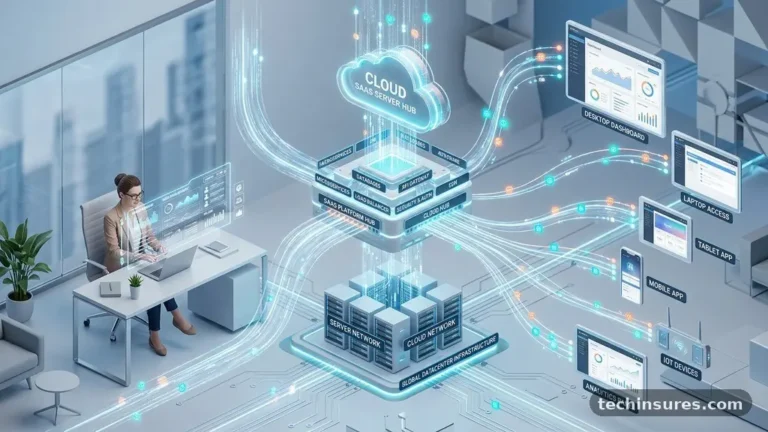
Cloud computing explained: what modern businesses need to know centers on moving away from local, hardware-heavy operations toward flexible, internet-based services. By hosting information and applications on remote servers, companies can scale their operations without purchasing expensive physical equipment. This shift allows teams to focus on growth rather than constant maintenance of internal IT systems.
Understanding this transition is essential for any organization looking to maintain a competitive edge in an increasingly digital marketplace. You will find that adopting these technologies fundamentally changes how your business handles data and interacts with global markets.
Defining the Core Mechanics
Cloud computing is the delivery of computing services—including servers, storage, databases, networking, and software—over the internet. Instead of maintaining a physical data center in your office basement, you rent access to these resources from providers like Amazon Web Services (AWS), Microsoft Azure, or Google Cloud.
These providers manage the hardware and software updates, ensuring your team has constant access to the tools they need. Think of it like a utility company; you pay for the electricity you consume rather than building your own power plant.
This model relies on virtualization, which allows a single physical server to host multiple virtual machines. By pooling physical resources, providers achieve massive economies of scale that are impossible for most individual businesses to replicate.
You are essentially leasing a slice of a massive, super-efficient infrastructure. This setup ensures that your business can expand its capacity during peak demand periods without needing to buy new hardware.
Key Benefits of Cloud Adoption
The most immediate advantage for businesses is the reduction in capital expenditure. Traditional IT requires large upfront investments in servers, cooling systems, and specialized staff to manage them.
With cloud services, you shift these costs to an operating expense model where you pay for what you use. This flexibility allows startups and established enterprises alike to allocate their budgets toward innovation rather than infrastructure maintenance.
Scalability is another major driver for adoption. If a marketing campaign suddenly drives ten times the usual traffic to your website, the cloud can automatically allocate more resources to handle the load.
Conversely, during slower periods, you can scale back to avoid overpaying for idle computing power. This elasticity is vital for modern businesses that face unpredictable demand cycles.
| Metric | Traditional IT | Cloud Computing |
|---|---|---|
| Upfront Cost | High (Hardware Purchase) | Low (Subscription) |
| Maintenance | In-house IT Team | Provider Managed |
| Scalability | Limited/Slow | Near-Instant |
| Accessibility | VPN/Office-bound | Global/Internet-based |
Public, Private, and Hybrid Models
Not all cloud environments are the same, and choosing the right one depends on your specific needs. A public cloud is owned and operated by a third-party provider, offering high scalability and low costs.
This is the most common choice for businesses that want to focus on their core products rather than managing hardware. It is ideal for startups and companies with fluctuating resource requirements.
Private clouds consist of computing resources used exclusively by one business. These can be located at your physical site or hosted by a service provider, but the key is that the environment is dedicated to you.
Many organizations in highly regulated industries, such as healthcare or finance, prefer this for the added control it provides over sensitive information. It offers the same benefits as the public cloud but with an extra layer of privacy.
A hybrid cloud combines both models, allowing data and applications to move between them. This setup gives you the flexibility to keep sensitive records in a private environment while using the public cloud to run high-volume, less sensitive applications.
It provides the best of both worlds, though it does require more sophisticated management. You can learn more about these architectural differences through the official definitions provided by the National Institute of Standards and Technology.
Security and Data Governance
Security is often the primary concern for businesses considering a move to the cloud. Many assume that keeping data on-site is inherently safer, but major cloud providers invest billions into security protocols that far exceed what most small or medium businesses can afford.
They employ teams of world-class experts to monitor for threats and implement advanced encryption standards. When you use these services, you benefit from the same high-level protection used by global banking institutions.
However, security remains a shared responsibility. While the provider secures the infrastructure, you are responsible for the data you put into that environment.
This includes managing access permissions, ensuring your employees use strong authentication methods, and maintaining secure configurations. If you leave a storage bucket open to the public, the provider’s security measures cannot stop an unauthorized user from accessing your information.
Essential Components of Cloud Infrastructure
At the heart of the cloud are three primary service models: Infrastructure as a Service (IaaS), Platform as a Service (PaaS), and Software as a Service (SaaS). IaaS provides the raw building blocks, such as virtual servers and storage, giving you maximum control over your systems.
PaaS offers a pre-configured environment for developers to build and deploy applications without worrying about the underlying hardware. SaaS delivers ready-to-use software directly through a web browser, such as email clients or customer relationship management tools.
Most businesses use a mix of these three. You might use SaaS for your daily productivity tools, PaaS for your internal development projects, and IaaS for your legacy database migrations.
This layering allows for a highly customized environment that fits your specific workflow. It also means you can swap out components as your business needs evolve over time.
Impact on Remote Work and Collaboration
Cloud computing has essentially enabled the modern remote workforce. Because applications and files are hosted centrally in the cloud, employees can access their work from anywhere with an internet connection.
This accessibility is no longer a luxury; it is a standard expectation for talent acquisition. Teams can collaborate in real-time on documents, share data instantly, and maintain productivity regardless of their physical location.
This shift also improves business continuity. If a local office suffers a power outage or a natural disaster, your operations continue unaffected because your systems are not tied to that specific building.
Data is mirrored across multiple geographic regions, ensuring that your information is backed up and recoverable. This reliability provides peace of mind that your business can survive unexpected disruptions.
Common Challenges to Overcome
Transitioning to the cloud is not without its hurdles. One common issue is “vendor lock-in,” where a business becomes so dependent on a specific provider’s proprietary tools that switching becomes difficult or expensive.
To mitigate this, many companies adopt a multi-cloud strategy, using different providers for different parts of their infrastructure. This approach keeps your options open but adds complexity to your management systems.
Another challenge is cost management, often called “cloud sprawl.” Because it is so easy to spin up new resources, businesses often end up paying for unused servers or storage that nobody is monitoring.
Implementing strict governance policies and using monitoring tools to track your usage is essential. You must treat cloud spending with the same rigor you would apply to any other major operational expense.
Frequently Asked Questions
What are the primary differences between public and private clouds?
Public clouds are shared environments owned by providers like AWS, offering high scale at a lower cost. Private clouds are dedicated to a single organization, providing more control and isolation but typically requiring a larger initial investment.
Is cloud computing safe for sensitive business data?
Yes, provided you follow best practices. Major providers offer industry-leading encryption and security features, but the responsibility for access control and configuration ultimately rests with the business owner.
What happens to my data if my internet connection goes down?
Your data remains safe in the cloud, but you will lose access until your connection is restored. Most businesses mitigate this by having backup internet circuits or using offline-capable applications that sync once connectivity returns.
Does using the cloud make my business more efficient?
In most cases, yes. By offloading maintenance and hardware management, your team can focus on software development and customer service rather than troubleshooting physical server issues.
Can I move my existing systems to the cloud easily?
It depends on how your current systems are built. While many applications can be “lifted and shifted,” some older, legacy software may require significant refactoring to perform well in a cloud environment.
Conclusion
Adopting cloud technologies is a strategic decision that touches almost every aspect of a modern business. By understanding the core mechanics and choosing the right service model, you can build a more resilient and flexible organization. Cloud computing explained: what modern businesses need to know is really about embracing a future where infrastructure is a tool for growth rather than a bottleneck.
Start by auditing your current IT needs and identifying which systems would benefit most from the flexibility of the cloud. Begin with non-critical workloads to get your team comfortable with the new environment before moving your core business functions.
As you integrate these services, you will likely find that your ability to adapt to market changes increases significantly. Keep your focus on long-term scalability and security to ensure your business remains agile and prepared for whatever comes next.