What Is Multi-Factor Authentication and How Does It Work?
Understanding the mechanics behind Multi-Factor Authentication and How Does It Work is a vital step toward protecting your digital life. At its core, this security layer moves beyond a simple password to confirm that you are truly who you say you are. By requiring two or more independent credentials, you create a significantly higher barrier for unauthorized intruders attempting to breach your private data.
Whether you are accessing a personal email account or a sensitive corporate portal, this process acts as a digital gatekeeper. This article explains the technical nuances of these systems and why they have become the industry standard for modern account protection.
The Fundamental Principles of Multi-Factor Authentication
The primary goal of MFA is to verify a user’s identity through multiple, independent categories of evidence. When you log into an account, a single password is no longer considered sufficient because it can be easily stolen through phishing or data breaches.
By requiring additional factors, you ensure that even if a hacker gains your password, they still cannot access your information. This multi-layered approach transforms security from a single point of failure into a redundant system.
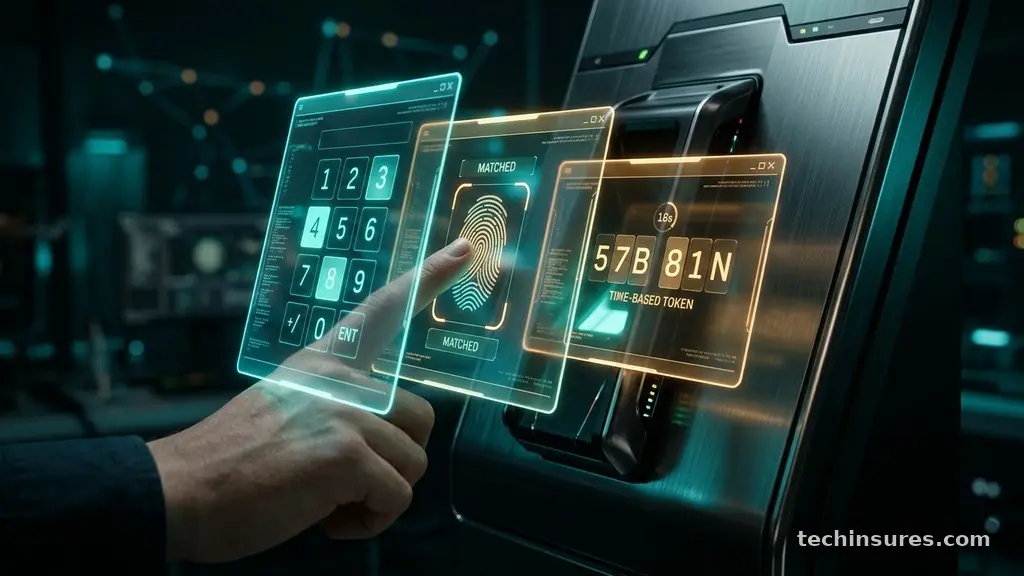
Authentication factors are generally categorized into three distinct types: knowledge, possession, and inherence. Knowledge factors are things you know, such as a password, a PIN, or the answer to a secret question.
Possession factors represent items you have in your physical control, like a smartphone, a hardware token, or a security key. Inherence factors are unique physical traits, such as a fingerprint scan, facial recognition, or iris patterns.
To achieve true multi-factor authentication, a system must require at least two factors from different categories. If you only provide a password and then answer a security question, you are using two knowledge factors.
This does not qualify as true MFA because both pieces of information are vulnerable to the same types of digital attacks. A strong configuration requires a combination like a password (knowledge) and a code from an authenticator app (possession).
How the Authentication Process Functions
The workflow begins the moment you enter your primary credentials into a login portal. Once the system validates your username and password, it triggers the secondary authentication phase.
This is the point where the server pauses the login attempt and requests further proof of your identity. You might receive a push notification, a text message, or an automated request to tap a physical security key.
Behind the scenes, the server communicates with an authentication service to verify the secondary factor. For example, if you use an authenticator app like Microsoft Authenticator, the app generates a time-based one-time password (TOTP).
This code is mathematically linked to the current time and a shared secret key stored on both your device and the server. Because the code changes every 30 to 60 seconds, a intercepted code becomes useless to an attacker almost immediately.
Once you submit the correct code, the server compares it against its own generated version. If the values match, the system grants you access to the account.
If they do not, the access request is denied, regardless of whether the initial password was correct. This entire exchange happens in a matter of seconds, providing a balance between high security and user convenience.
Common Authentication Methods Explained
Different platforms offer various ways to satisfy the multi-factor requirement depending on the user’s hardware and security needs. The most common method involves SMS-based codes, though this is increasingly viewed as less secure due to risks like SIM swapping.
More robust methods rely on mobile applications that generate codes locally on your device without needing an internet connection. Hardware security keys, such as those produced by Yubico, provide the highest level of protection by using physical cryptography.
Biometric factors are also gaining popularity due to their ease of use and unique nature. While facial recognition and fingerprint scanning are convenient, they rely on the hardware capabilities of the device you are using. Below is a summary of the most prevalent factors currently in use by major services:
| Factor Type | Examples | Security Level |
|---|---|---|
| Knowledge | Passwords, PINs | Low |
| Possession | SMS codes, App tokens | Medium |
| Possession (Hardware) | USB Security Keys | Very High |
| Inherence | Fingerprint, Face ID | High |
Why Traditional Passwords Fail Alone
Passwords have been the standard for decades, but they have fundamental flaws that make them easy to exploit. Users often reuse the same password across multiple sites, which means a single breach at one company can expose dozens of other accounts.
Furthermore, sophisticated phishing campaigns can trick even savvy users into entering their credentials into fake websites. Once a password is captured, an attacker has complete control over that account.
MFA mitigates these risks by breaking the reliance on a single piece of static information. Even if a bad actor manages to phish your password, they are stopped cold by the second requirement.
Because they lack physical possession of your registered device, they cannot complete the login sequence. This effectively renders stolen passwords nearly worthless for unauthorized account takeover.
Businesses and individuals adopt this technology to protect sensitive information from automated bot attacks. Bots often use lists of leaked credentials to “stuff” logins across the web, trying to find matches.
Because these bots cannot solve a secondary challenge, they are blocked before they can cause damage. This simple shift in architecture prevents the vast majority of automated identity theft incidents.
The Role of Hardware Security Keys
Hardware security keys represent the pinnacle of modern authentication technology. These devices, which often look like small USB sticks, use public-key cryptography to verify your identity.
When you plug the key into your computer or tap it against your phone via NFC, it performs a cryptographic handshake with the service. This process is resistant to even the most advanced phishing attacks.
Unlike codes sent over text or generated in an app, hardware keys are physically bound to the user. A phishing site cannot replicate the physical signal required by the key to authorize the login.
This makes hardware keys the preferred choice for high-profile users, journalists, and corporate employees handling sensitive data. While they require a small upfront cost, the investment provides a level of peace of mind that software-based solutions cannot always match.
Setting up these keys is usually straightforward. You register the device with your account settings, and from that point on, you simply carry the key with you.
If you lose your key, most services provide backup codes or recovery methods to ensure you are not locked out of your own account. It is a highly effective way to ensure your digital identity remains strictly under your control.
Challenges and Considerations
Despite the clear benefits, implementing multi-factor authentication comes with practical hurdles. The most common complaint is the friction it adds to the login process.
Users who are used to simply typing a password may find the extra step of checking a phone or tapping a key to be inconvenient. Organizations must balance this friction against the risk of a data breach.
Recovery is another critical area that requires planning. If you lose your primary device or delete your authenticator app, you could lose access to your accounts entirely.
Most platforms solve this by offering backup recovery codes that you should store in a safe, physical location. Without these, the very security that protects your account can also work against you.
Cost is also a consideration for large organizations managing thousands of users. While software-based tokens are often free, hardware keys represent a recurring expense as employees join or leave the company.
However, when compared to the potential cost of a data breach, the expense of implementing MFA is widely considered a necessary cost of doing business. It is a fundamental component of any modern digital safety strategy.
Frequently Asked Questions
Is multi-factor authentication the same as two-factor authentication?
The terms are often used interchangeably, but there is a slight technical distinction. Two-factor authentication (2FA) specifically requires exactly two factors. Multi-factor authentication (MFA) refers to any system that requires two or more factors. In practice, they both serve the same purpose of adding layers to your login process.
What happens if I lose my phone and cannot get my MFA code?
Most services provide a set of one-time backup codes when you first enable MFA. You should print these or save them in a secure password manager. If you lose your phone and do not have these codes, you will likely need to use the account recovery process, which can involve identity verification through customer support.
Is it possible for an attacker to bypass MFA?
While no system is 100% impenetrable, bypassing MFA is significantly harder than guessing a password. Some advanced phishing techniques, known as “MFA fatigue” or “adversary-in-the-middle” attacks, attempt to trick users into approving a push notification or capturing a session token. Using hardware keys or FIDO2-compliant security methods is the best way to prevent these types of sophisticated bypass attempts.
Does using MFA make my account completely unhackable?
MFA is a powerful defense, but it is not a silver bullet. You should still use long, unique passwords managed by a reputable tool. You must also remain vigilant against phishing attempts that try to steal your session tokens or trick you into approving unauthorized login requests.
How much does it cost to set up MFA?
For individuals, MFA is almost always free. You can use free apps like Google Authenticator or built-in OS features like passkeys or biometrics. Businesses may pay for premium versions of authentication services to get better management tools and integration with their existing IT infrastructure.
Conclusion
Securing your digital identity is no longer an optional task in our interconnected world. By understanding the principles of Multi-Factor Authentication and How Does It Work, you empower yourself to take control of your private information. The transition from a single password to a multi-layered security model is the single most effective action you can take to prevent account takeovers.
Whether you choose a simple authenticator app or a dedicated hardware security key, you are building a wall that most attackers simply cannot climb. Start by enabling this protection on your most sensitive accounts today, such as your primary email and banking portals. Your digital security is a continuous process, and adopting these habits ensures your data remains safe for years to come.